Syncro - Inventory App
IntroductionSyncro is a specialized web application created to streamline inventory management and sales operations. It originated as a solution for Millenium Mania, a retail business based in Cumaná, Sucre State, Venezuela. The development of Syncro was prompted by the widespread adoption of Cashea, an installment payment app with over seven million users across the country. This surge in digital payments presented new operational challenges: Millenium Mania required a tool capable of tracking payment schedules, managing installment statuses, and syncing monthly transaction summaries with the Cashea platform. Syncro was built to fulfill these needs by providing transparent, organized control over financial declarations.
Application Structure Syncro is composed of five essential modules, each designed to address specific business needs:
- Inventory Management – Monitors product quantities, modifications, additions, and removals.
- Billing and Invoicing – Facilitates the generation of invoices for both installment and direct purchases.
- Cash Closing – Allows users to reconcile cash flows and transactions by filtering activity per day.
- Report Generation – Produces structured monthly and annual summaries for accounting and business review.
- Detailed Activity Charts for the Year – Visually represents sales behavior, product demand, and other metrics through interactive graphs.
- Development began on April 12, 2025. Using Figma, designers drafted an interface proposal and modeled use cases to define the client’s requirements—both functional (what the app should do) and non-functional (how the app should perform).
Project Architecture Syncro’s development stack is separated into three logical layers, each serving a distinct role in the system’s design and delivery.
Frontend technologies and tools- Figma
- Astro
- React
- Zustand
- JavaScript
User experience was a primary focus. The interface was built from the ground up in Figma to ensure clarity, visual appeal, and ease of navigation. It incorporates various interactive components to enable efficient task completion, including:
- A navigation bar for intuitive module switching.
- A header with integrated search and live exchange rate tracking (USD to Bolívar).
- A dynamic homepage with tools to create orders (Cashea and direct sales), search products, and filter daily activity logs with real-time notifications.
- An orders page that lets users update the status of payment installments (pending, unpaid, paid, bank error), view product summaries, and track payment methods.
- A product page for managing item attributes—editing, adding, or removing entries.
- A cash closing module that organizes daily revenue reconciliation.
Astro was selected as the core framework to scaffold and style the frontend efficiently. Its integration with React and Zustand ensures responsive behavior, simplified state handling, and smooth user interactions.
Backend technologies- Python
- Flask
- flask-login
- PostgreSQL
The backend follows the Model-View-Controller (MVC) design pattern and is built using Flask. This structure promotes modularity and scalability while maintaining a secure environment for business logic and data operations. Syncro’s APIs are crafted to maintain system performance—even in cases of intermittent connectivity. PostgreSQL was chosen for its reliability and robustness as the main relational database system.
| Relationship | Type |
|---|---|
| Operation → Customer | Many to One |
| Operation → State | Many to One |
| Installment → Operation | Many to One |
| Installment → Revenue | Many to One (optional) |
| Installment → Dolar_rate | Many to One (optional) |
| Installment → Installment_type | Many to One |
| Installment → State | Many to One |
| Operation_has_product → Operation | Many to One |
| Operation_has_product → Product | Many to One |
| Operation_has_payment → Operation | Many to One |
| Operation_has_payment → Payment_method | Many to One |
| Product → Category | Many to One |
| Product → Color | Many to One |
| Product_has_warehouse → Product | Many to One |
| Product_has_warehouse → Warehouse | Many to One |
| Revenue → Month | Many to One |
Click to see detailed database
Cloud deployment technologies- Docker
- pgAdmin
Various deployment strategies were considered, but Docker was ultimately selected due to its security features and containerized architecture. Packaging the app within Docker allows it to run in isolated environments, ensuring it performs optimally on a dedicated server without risk of conflicts or data leakage.
System Page OverviewThis application is structured around a set of functional pages, each designed to streamline operations and provide full administrative control. From real-time dashboards to financial reconciliation tools, every section plays a key role in maintaining transparency, efficiency, and traceability throughout the client lifecycle. Below is a breakdown of the system’s core pages and their respective roles.
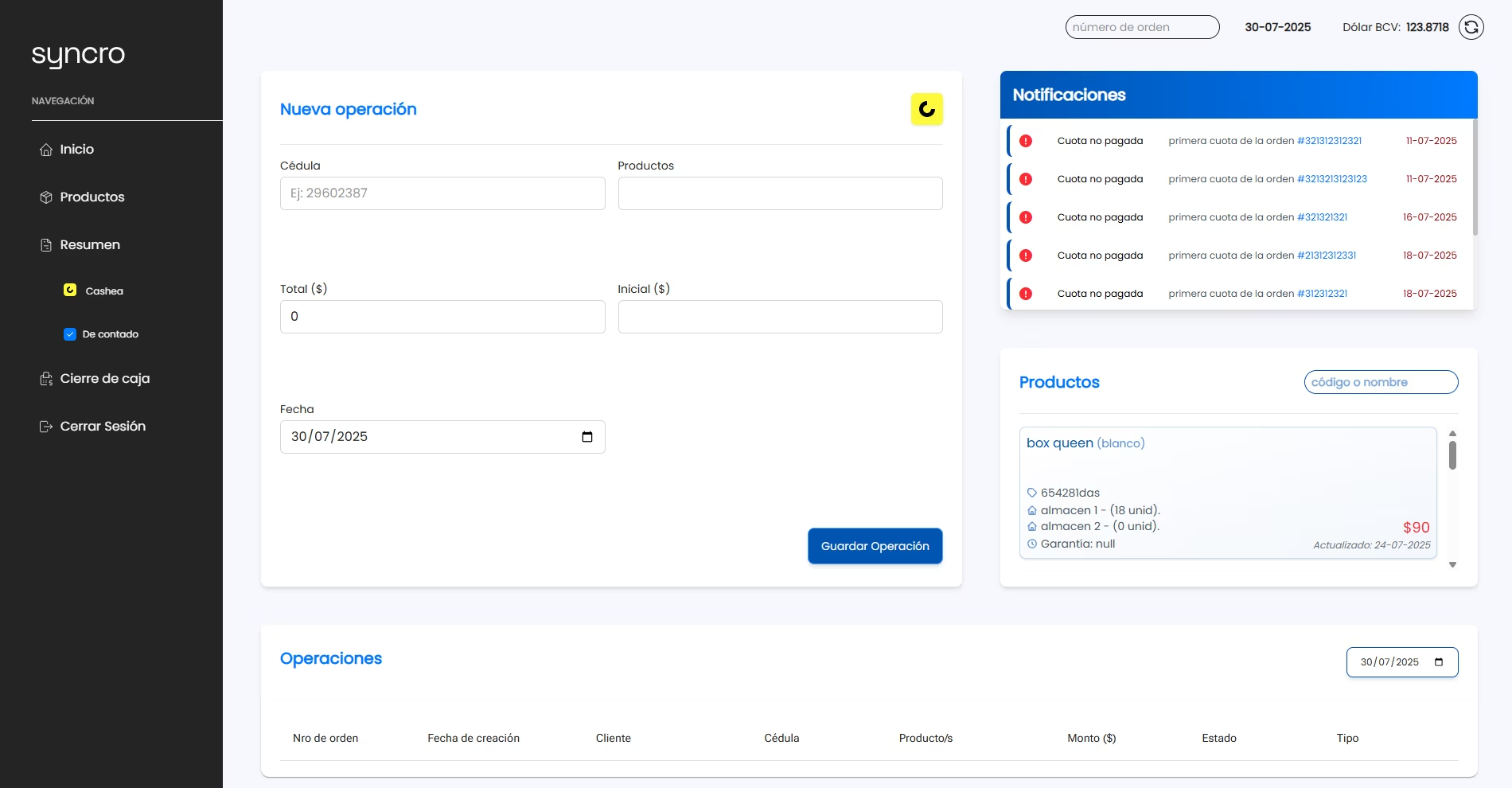
Syncro app - Main page.
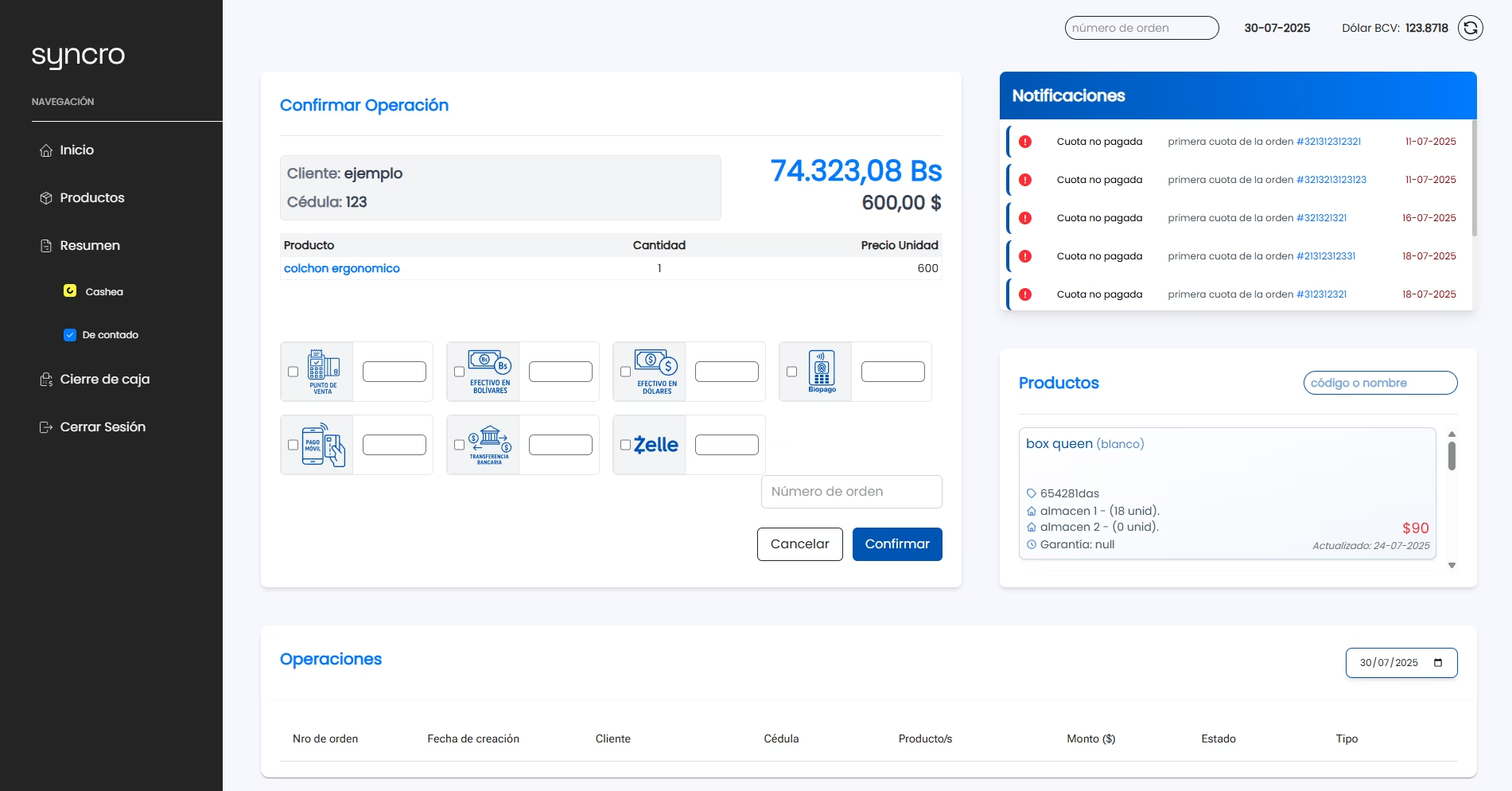
Syncro app - Operation page, sale view.
The homepage functions as a dynamic control center, providing real-time access to ongoing operations, customer notifications, and order creation tools. When a new order is initiated through the form, the administrator can define the type of operation via the “Cashea” button, which dynamically toggles based on the order context. For standard cash transactions, the button remains disabled, preserving the fixed nature of the payment. However, when handling Cashea orders, the button becomes active, allowing the admin to designate and adjust the operation type according to the client’s financing preferences., the system transitions smoothly into a product selection interface, where items are added for purchase. This process culminates in the generation of the corresponding invoice, completing the transaction with precision and clarity.
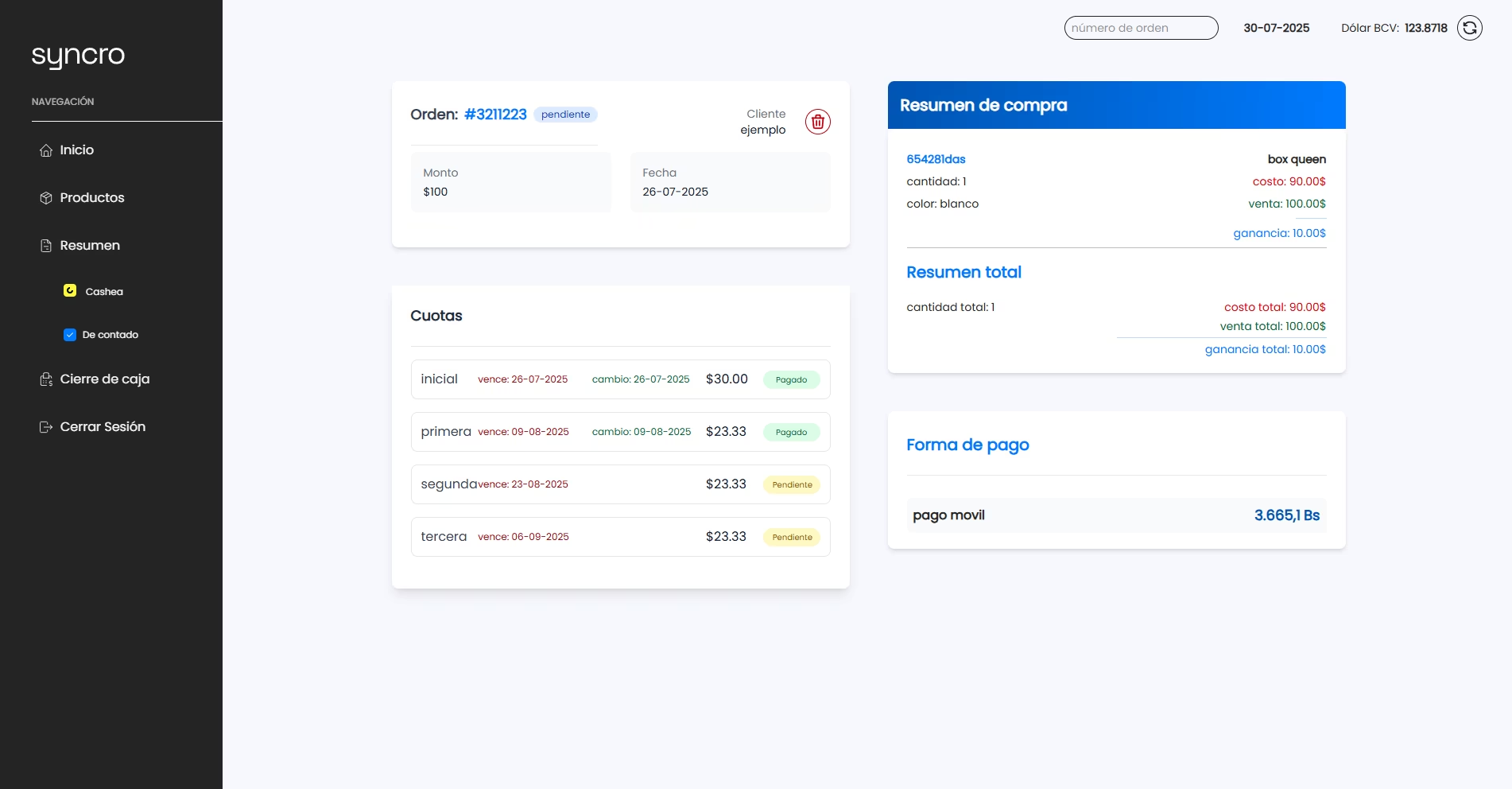
Syncro app - Operation page.
The Operation page provides an in-depth overview of the selected order, clearly outlining the purchaser’s identity, total amount, available payment methods, and a detailed summary of the included products. Its most distinctive feature is the administrator’s ability to dynamically update the status of installment payments as the client progressively settles the debt, ensuring accurate financial tracking throughout the transaction lifecycle.
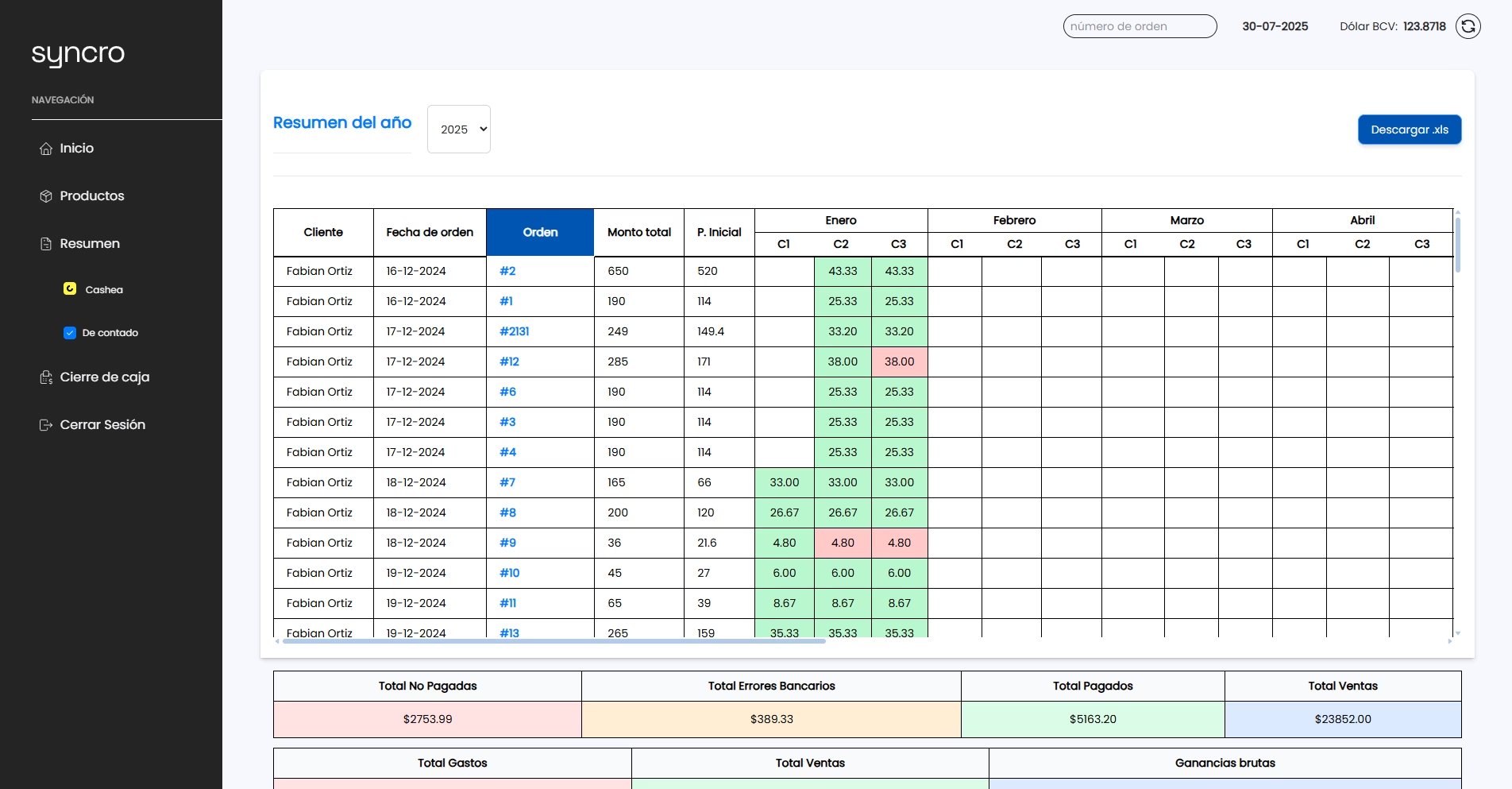
Syncro app - Summary page.
The Summary page delivers a comprehensive annual report detailing all processed orders. It presents a tabular view of every installment, along with its current status, offering a clear trace of client activity—including completed payments, delays, and outstanding dues. This centralized overview empowers the administrator with full control over operational records and client behavior. Additionally, the system provides a downloadable .xls.
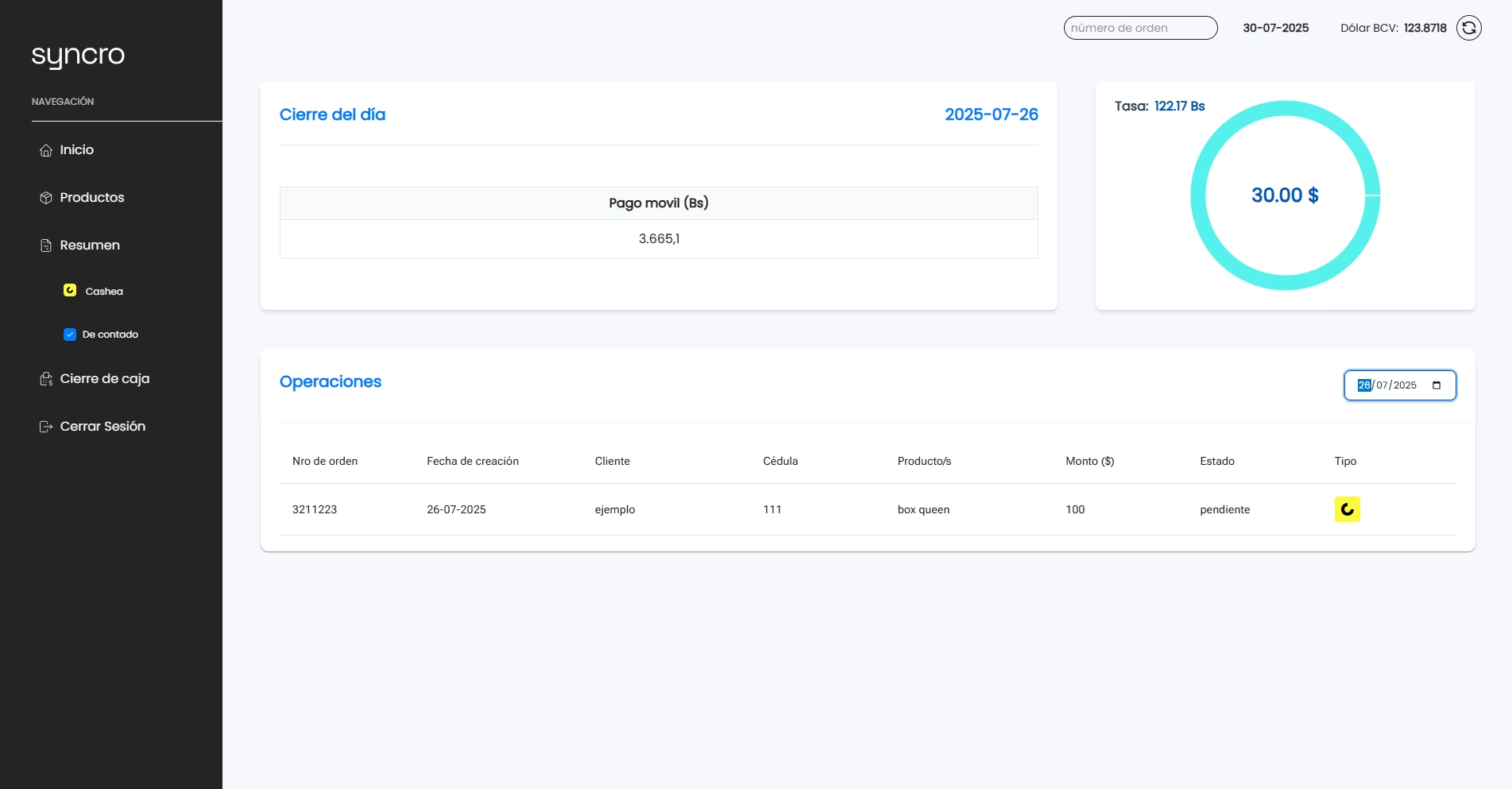
Syncro app - Cash closing page.
The Cash Closing page provides administrators with a detailed breakdown of the total funds processed during the day, categorized by each payment method used. It displays all recorded transactions filtered by the selected date, ensuring clear traceability of daily activity. Complementing this view, a donut-style chart visually represents the earnings in U.S. dollars, calculated using the exchange rate corresponding to the chosen date. By default, the system synchronizes with the current calendar day, offering a streamlined experience for daily financial reconciliation.